Not directly, as far as Anthropic documents it. Claude’s file upload guide lists documents and images but no video format, and we found no Anthropic help article on Claude watching a YouTube link. Claude can still analyze a video once you turn it into what it reads: a timestamped transcript for the speech and still frames for the picture. In the Claude apps you do that conversion yourself. In Claude Code, Claude can do it on your computer, and with ChatCut Desktop connected it can pull frames at exact times and a word-timed transcript straight from your footage.
We checked Anthropic’s help center and developer docs on November 4, 2026, then ran the transcript-and-frames route in Claude Code on a 10-second clip. The results, including what each route missed, are below. This guide is about getting Claude to understand footage; to have Claude cut it, see how to edit video with Claude.
What Claude can use from a video
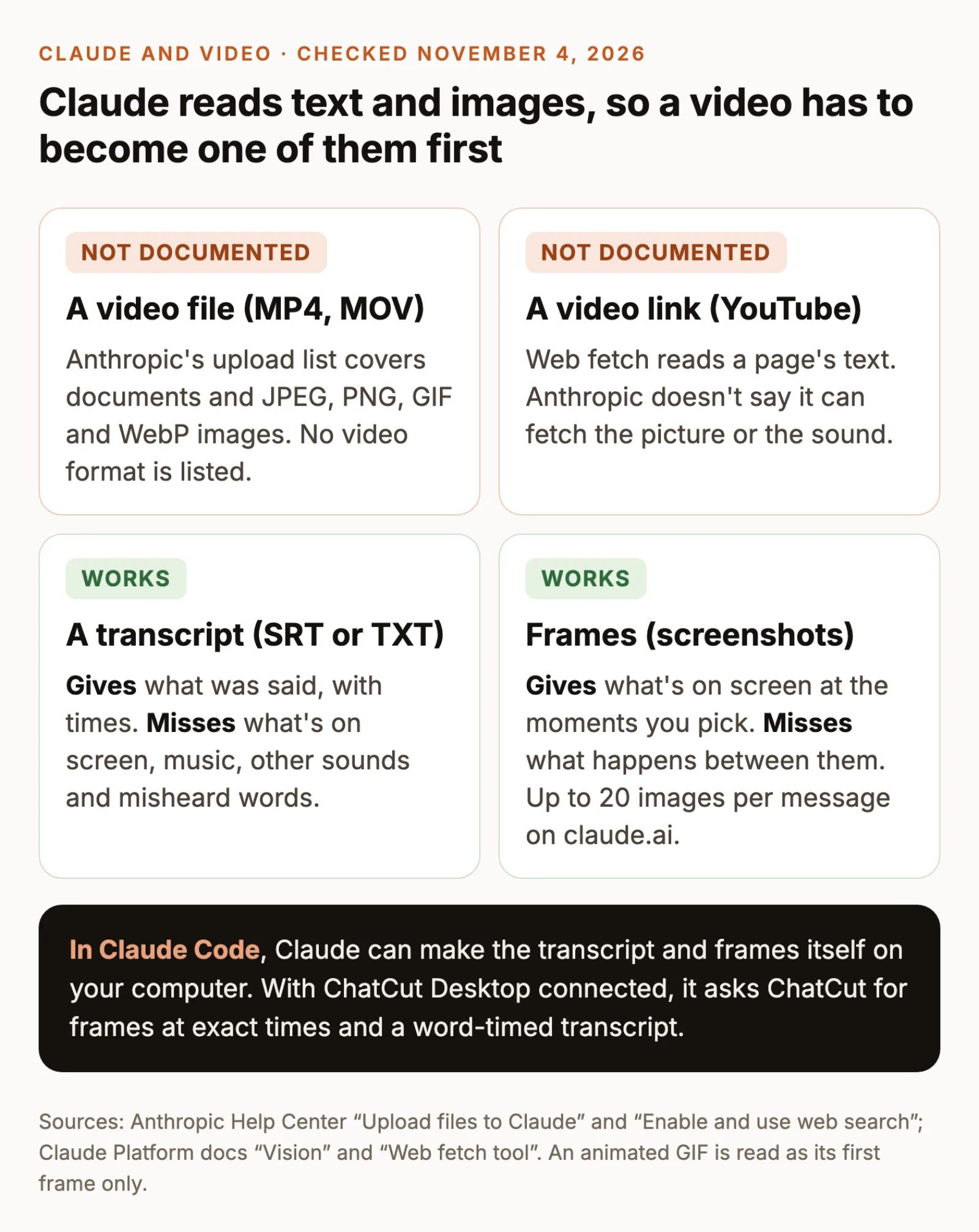
Claude reasons over text and images. Each workaround in this guide converts a video into one or both of those, so the useful questions are which conversion fits your video and what it leaves out. A transcript suits a lecture or interview, where the words carry the content. Frames suit a product demo, a screen recording or a sports clip, where the picture does. Most videos need some of each.
Can Claude watch videos directly?
Here is what Anthropic’s current documentation says about each place you might try.
- Uploading a video file. The upload guide lists PDF, DOCX, CSV, TXT, HTML, ODT, RTF, EPUB, JSON and XLSX documents, plus JPEG, PNG, GIF and WebP images. Chat uploads can be up to 500 MB per file, but that limit applies to the listed types; it isn’t a video allowance. An animated GIF doesn’t get around it: Anthropic’s vision guide says only the first frame of an animation is used.
- Pasting a YouTube link. With web search on, Claude can open a link and read “the full content of articles, blog posts, and other web pages,” according to Anthropic’s web search guide. Neither that guide nor the developer docs for the web fetch tool mention video or audio. A video page carries a title, a description and other text, so a confident summary of a link can come from that text without anything having watched the video.
- Claude in Chrome. The browser extension, available on paid plans, reads pages and takes screenshots while it works. A screenshot of a playing video is a single frame, and Anthropic doesn’t describe the extension as a way to watch video.
- The Claude API. The vision guide accepts the same four image formats and has no video input. Developers who build video features send frames instead: up to 600 images per request, or 100 on models with a 200k-token context window.
We didn’t test every Claude app and plan, and Anthropic adds features often. If your Claude app accepts a video file anyway, check what it actually saw before relying on it. Use a clip with no speech, ask what’s on screen at a specific second, and compare the answer with that moment yourself. A silent clip can’t be summarized from its words, so a correct answer has to come from the picture.
Claude chat versus Claude Code
In Claude’s website and its desktop and mobile chat, you do the conversion: you paste a transcript or attach screenshots, and Claude reasons over what you gave it. Claude Code runs on your computer, so it can run a frame-extraction or transcription tool installed there on a local file, read the results and decide which moments to look at more closely. It still doesn’t watch the video as it plays. It reads the frames and text those tools return, so the same gaps apply. What changes is who does the tedious part and how quickly Claude can go back for a second look.
What to upload to Claude instead
The files you’ll use are the ones the upload guide does list:
- Transcripts and notes: paste the text, or attach a TXT, PDF, DOCX or other listed document.
- Frames: JPEG, PNG or WebP images, up to 8000 × 8000 pixels each. On claude.ai, the vision guide allows up to 20 images per message.
- How to attach: click + in the lower left of the chat box, choose Add files or photos, select the files and click Open, or drag them into the chat. You can also paste an image from the clipboard.
- Chat, not project: Anthropic lists project files as text extraction only, except for PDFs with visuals, and limits them to 30 MB each. Attach frames to a chat message so Claude sees the pictures.
How to summarize a video with Claude from its transcript
For lectures, interviews, podcasts and tutorials, the words carry most of the content, and a transcript is the quickest route.
Copy a YouTube transcript
On a YouTube video with captions, open the description and click Show transcript. YouTube lists the captions line by line with timestamps, and clicking a line jumps to that moment. Copy the text with its timestamps and paste it into Claude. The button only appears on videos with captions, and automatic captions, like any speech recognition, can mishear names, terms and numbers; our test below has an example.
Transcribe your own recording
For a file on your computer, any transcription tool that exports timestamps will do. In ChatCut, import the file with My Assets → Upload → Files…, drag it onto the timeline, wait for its words to appear in the Transcript panel, then choose Export → Subtitles → SubRip (.srt). An SRT file keeps a start and end time on every line, which is what lets Claude point you back to the right moment. Plain text (.txt) is shorter but loses the times. The transcript and captions guide covers choosing the right track when a project has several. Transcription is included on ChatCut’s Free plan.
Paste the transcript under this prompt:
The last two instructions matter. Without them, Claude may fill a visual gap with a plausible guess or estimate times from word counts, and both read just as confidently as the parts that came from the transcript.
How to show Claude what happens on screen
For anything visual, such as a product demo, a screen recording or a scene from a film, give Claude frames: still images from chosen moments, each labelled with its time.
Pick the moments and label them
- A few moments: pause the video, take a screenshot (Shift-Command-4 on a Mac, Windows logo key + Shift + S on Windows) and write down the time.
- Evenly through the video: if you have FFmpeg installed,
ffmpeg -i video.mp4 -vf fps=1/10 frame_%03d.jpgsaves one frame every 10 seconds. File 001 is 0:00, file 002 is 0:10, and so on. - Type the times in your message, for example “Frame 1: 0:00, Frame 2: 0:10”. Anthropic’s vision guide says Claude doesn’t receive image metadata, so a time stored inside the file never reaches it.
Claude won’t name people from their faces, per the same guide, so if your question is who is speaking, give Claude the name from the captions or an on-screen title.
Work within the frame budget
Twenty images per message goes quickly. At one frame every 30 seconds, a 10-minute video fills the whole budget, and anything that happens between two samples is invisible. Three ways to stretch it:
- Split the video into sections and send each with its own frames and stretch of transcript.
- Ask Claude where to look. After a first pass, ask which time ranges it would need to see more closely, then send frames from only those ranges.
- Combine frames carefully. A grid of frames fits more moments into one image, but each tile gets smaller: Claude scales large images down, to 2,576 pixels on the long edge for Claude 4.7 and later models and 1,568 pixels for others, so small on-screen text in a tile can become unreadable. A PDF is another documented route, since Claude analyzes the visuals in PDFs of up to 100 pages; we haven’t tested how closely it reads each page of a frame-by-frame PDF.
Send the frames with the matching stretch of transcript and this prompt:
What a transcript and frames missed in our test
To see where each route breaks, we ran both on a 10-second clip from one of our own Skill demos: a presenter, a notebook-style agenda and an animated chart about compound interest. We used Claude Code with ChatCut Desktop connected, so Claude asked ChatCut for the transcript and the frames rather than us preparing them.
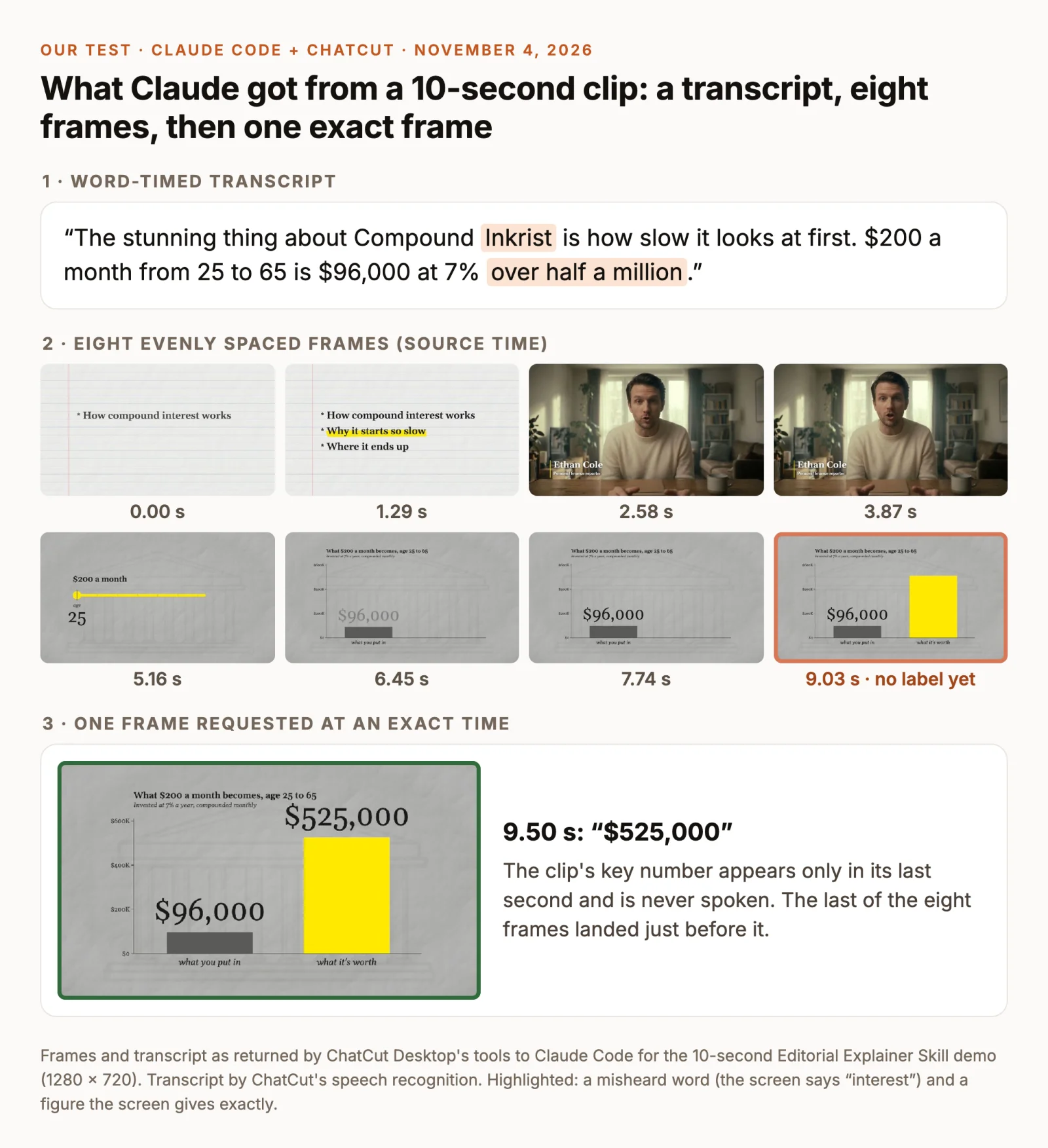
Here is what each source supported on its own:
- The transcript alone got the argument and the spoken numbers right, including $96,000 and 7%. It heard “interest” as “Inkrist” and gave the result only as “over half a million”.
- The eight evenly spaced frames caught the agenda, the presenter’s name card, the chart’s title and the $96,000 bar. The last one, at 9.03 seconds, landed just before the result’s label appeared, so the frames never showed the clip’s main number.
- Both together, plus one frame requested at 9.5 seconds, settled both problems. The agenda’s “How compound interest works” corrects the transcript, and the exact frame shows $525,000.
The fix came from using one source to aim the other. The transcript placed “over half a million” between 8.96 and 10.05 seconds, and a frame from inside that range showed the exact figure. This was one short clip, so it shows where each route can break, not how often it does.
Use Claude Code and ChatCut when analysis should become an edit
If you’re analyzing your own footage because you want to cut it, keep the analysis where the edit will happen. Our guide to editing video with Claude covers setup: ChatCut Desktop on the same Mac or Windows PC as Claude Code, then a new Claude Code conversation. Once connected, Claude can ask ChatCut for evenly spaced frames or frames at exact source times and read the word-timed transcript, which is what produced the test above. ChatCut Desktop also adds its workflow Skills to Claude Code, including a scene-by-scene analysis workflow that pairs the frames from each scene with the words spoken in it.
Running on your computer doesn’t mean nothing leaves it: the frames and text Claude reads are sent to Anthropic as part of the conversation. Start with a request that reads and reports, without editing:
Check two or three of the times it cites against the Viewer before trusting the rest. Then turn the findings into a decision rather than an edit:
Once you’ve picked, the clip can be built on the timeline, where you can watch it and adjust each cut. Our walkthrough on turning long videos into shorts covers writing the brief, reviewing the framing and revising captions.
Method and disclosure
ChatCut publishes this guide. We read Anthropic’s help articles “Upload files to Claude”, “Enable and use web search” and “Get started with Claude in Chrome”, and the Claude Platform docs “Vision” and “Web fetch tool”, on November 4, 2026. We didn’t test video uploads in every Claude app or plan. The test ran once, in Claude Code with ChatCut Desktop connected, on the 10-second demo clip shown above; the transcript came from ChatCut’s speech recognition. Claude’s features change, so check the linked pages before you build a workflow on any of these limits.
Questions about Claude and video
Can Claude accept videos?
Can Claude watch YouTube videos?
Does Claude analyze images?
Can Claude analyze TikTok videos?
Which AI is best for analyzing videos?
What does video analysis mean?
Claude can’t sit through a video, but it can reason well over a good transcript and the right frames. Pick the conversion that matches your video, aim frames with the transcript, and check what Claude cites before you act on it.